What a One-Person AI Org Looks Like at 90 Days
A one-person AI org is a structured team of AI agents, skills, workflows, hooks and memory that a single person can operate. The purpose of this article is to share how powerful Claude Code is beyond what's previously been primarily an engineering conversation, and what 90 days of effort spent after hours can translate into. I will be sharing exactly what that looks like, what value that's created for me personally and professionally, and where I see the next 90 days taking me. For those that have not taken the plunge into this space, my aim is to inspire and show what can be done beyond a generic ChatGPT interaction.
How to Get Started
What I'm about to share might come across as seemingly out of reach, but looking back, I believe anyone can take this journey too.
Like any journey it starts with taking that first step. Unlike linear journeys, this one is defined by 'the exponential', meaning the steps you take might've been fixed stride lengths in the past but now with AI those steps become leaps and bounds, and even then there are some 'steps' I've reflected on and can only describe as superhuman.
That first step, get Claude Code. Yes there are other options out there, for example ChatGPT codex, but this article is not about comparing frontier models. You can't go too wrong investing the next 90 days in Claude Code and much of your learnings will be transferable.
If you're starting from scratch Anthropic Academy have a range of free courses to get you going.
What a one-person AI org contains
Here is what mine looks like at 90 days, laid out across the dimensions of capability stack, infrastructure, projects, output, volume, velocity. This shape is not prescriptive, yours will be different based on your objectives, and it's something that changes daily.
| Dimension | Count | Description/examples |
|---|---|---|
| CAPABILITY STACK | ||
| Agents | 94 | 9 chiefs/exco + 85 specialists |
| Skills | 128 | Reusable processes, archive shows the iteration trail |
| Hooks | 4 | Session lifecycle + safety guards |
| Workflows | 27 | Named orchestration chains across workstreams |
| Workflow steps | 171 | Individual stages within each workflow |
| Memory engrams | 173 | Persistent rules and learnings the AI carries across sessions |
| Episodes | 281 | One per session or ~4 per day |
| Global memory docs | 9 | Exec-Summary, architecture, glossary, soul, patterns, etc |
| Scheduled tasks | 32 | Market intel, Email digest summaries, home telemetry |
| Python scripts | 297 | Prediction models, backtesting, signal detection, reporting |
| INFRASTRUCTURE | ||
| Cloud services | 6 | Hosting, tunnel, three broker servers, bot host |
| Local deployments | 3 | MacBook Pro, Geekom A8 Max 24/7, Samsung SmartTV |
| Smart home | 6 | Sigenergy battery, Ecowitt weather, Tapo plugs, Deco mesh |
| Storage | 195 | ~165 GB model weights, under 2 GB code and prose |
| Git repos | 11 | Local repos across projects, mirrors on GitHub |
| Network/sync | 2 | Tailscale private network, Syncthing folder sync |
| Local LLM models | 36 | ~135 GB image+video, 30 GB Ollama text |
| External AI APIs | 11 | Anthropic, Gemini, OpenAI, Perplexity, Brave Search |
| MCP servers | 7 | Gmail, Calendar, Drive, Playwright, Discord, Figma, Apify |
| Active domains | 4 | Brand, product, and dev surfaces |
| PROJECTS | ||
| Project directories | 72 | Across 3 buckets: AI Org, Clients, Personal |
| AI Org | 32 | Agent teams workflows, Agents SDK, autoresearch, strategy |
| Clients | 21 | Non commercial client demos across product and design |
| Personal | 19 | Home automation, creative tools, health, finance |
| Dashboards | 15 | Operational UIs for trading, AI org orchestration, design |
| OUTPUT LAYER | ||
| Apps | 5 | Mobile + web product apps, mostly private |
| Articles total | 41 | 32 published, 5 draft, 4 backlog |
| Curated resources | 305 | Across 10 categorised sections on hcd.ai/resources/ |
| Design systems | 4 | Brand ref, org system, two client systems |
| LinkedIn posts | 12 | All tied to articles |
| Reports | 177 | Analytics pulls, AEO/GEO insights, audits across all projects |
| Research | 733K | 35 topics, 270 files, 733K words |
| Websites | 4 | Primary brand, org secondary, two client estates |
| VOLUME | ||
| Code LOC | 490,612 | HTML 134K, Python 93K, JS 66K, JSON 58K, TS 49K |
| Code-to-prose ratio | 1.10:1 | Was 1.12:1, drifting toward parity |
| Grand total LOC | 937,842 | Lines of code, includes markdown files |
| HTML files | 67 | Generated static pages on hcd.ai |
| Image assets | 98 | AI-generated heroes, social cards, diagrams |
| Markdown lines | 413,375 | Articles, research, briefs, and project docs |
| Prose files | 818 | Research 270, episodes 281, memory 173, agents 94 |
| Markdown words | 4,082,911 | Word count across the same .md files |
| VELOCITY | ||
| Commit window | 71 | Total days, git not added straight away |
| Active commit days | 64 | Of 71 elapsed days |
| Touch rate | 90% | Was 93% on day 60, elapsed outpacing active |
| Total commits | 305 | ~4.8 per active day |
Value created, the "so what?"
The inventory above is what a one-person AI org looks like at 90 days, but ultimately, so what?
Compounding knowledge. The AI org gets better at my specific work the longer I run it. Nothing resets between sessions. Last week's rejected phrasings, the briefs that landed, the shortcuts I take when I am tired, the AI org has all of it on file. Each session starts further forward than the one before.
Always-on operating environment. The platform runs when I do not. The market intel digest is already in my inbox by the time I have made coffee on Monday, with the overnight reports underneath it and the resources scout's proposed new entries underneath that.
The foundations to scale AI agent teams. Adding agents takes a fraction of the time of what adding the first one did. Voice rules, brief templates, the memory layer, the verification pass, the lint, the deploy gates, all there on day one for new agents to inherit. The focus now moves on how to do more work, more quickly and with higher quality and autonomy.
The ability to automate and parallelise work. Inside a single session I might have a research agent working one part of a brief while a peer-reviewer scrutinises another. Scheduled jobs pull the reports I used to forget to run. Briefs draft themselves while I am doing something else. Work that used to wait for me does not wait anymore.
The learnings and perspectives gained along the journey. The hands on execution has taken my knowledge to another level. The journey has also radically changed how I think about creating and delivering value and the future ways of working, spoiler alert, it does not involve adding AI to what we currently do, but letting AI re-imagine how we can more effectively do it.
Examples of work (screenshots)
The following 7 projects represent a small selection of work completed over the 90 days. Each is working capability I regularly use.
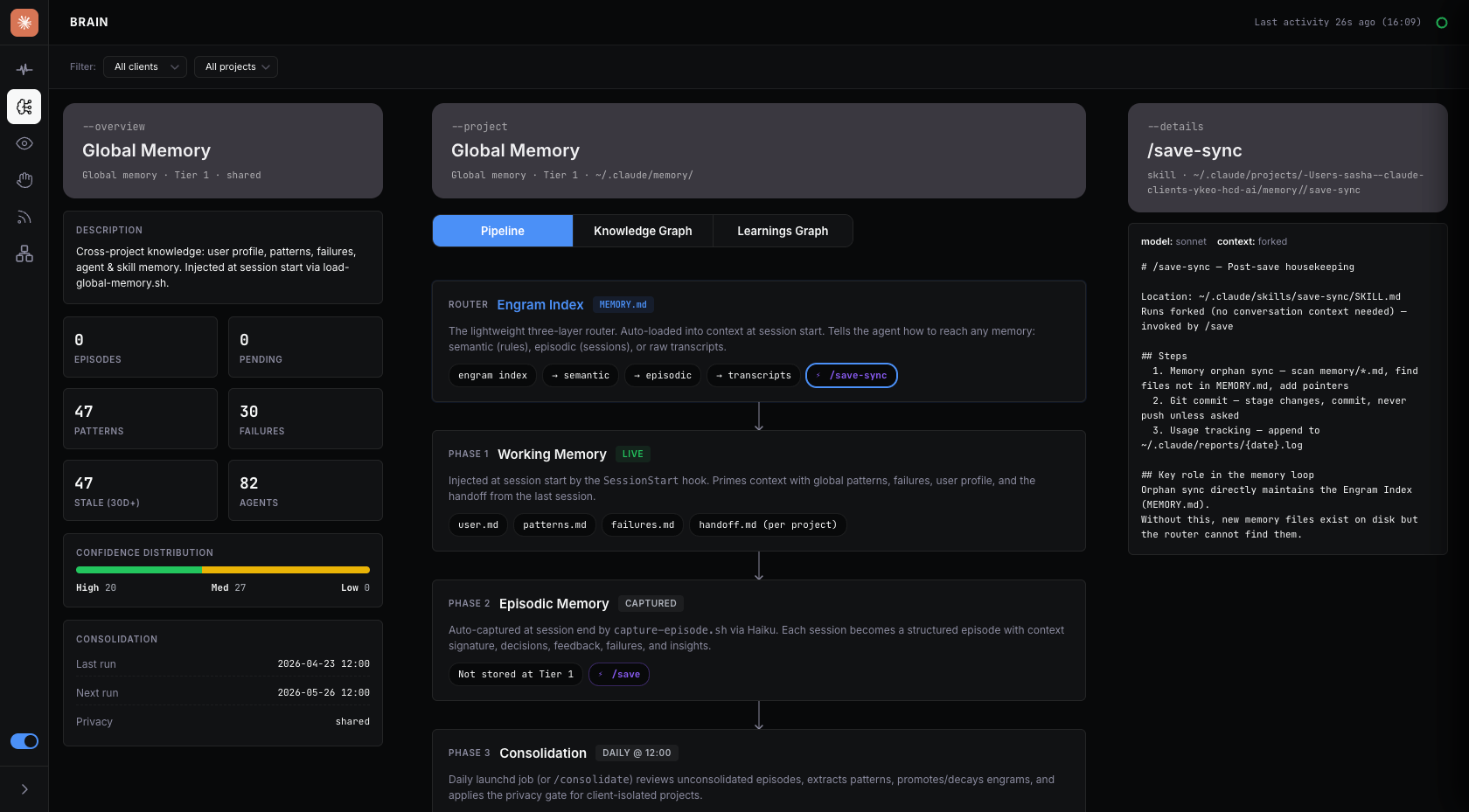
AI Org memory. An engram index is the routing layer for every memory the platform carries between sessions. Each entry is a one-line pointer into an extracted learning, a feedback rule, a reference fact, or a project state. This is what compounding knowledge across interactions looks like at an organisational scale.
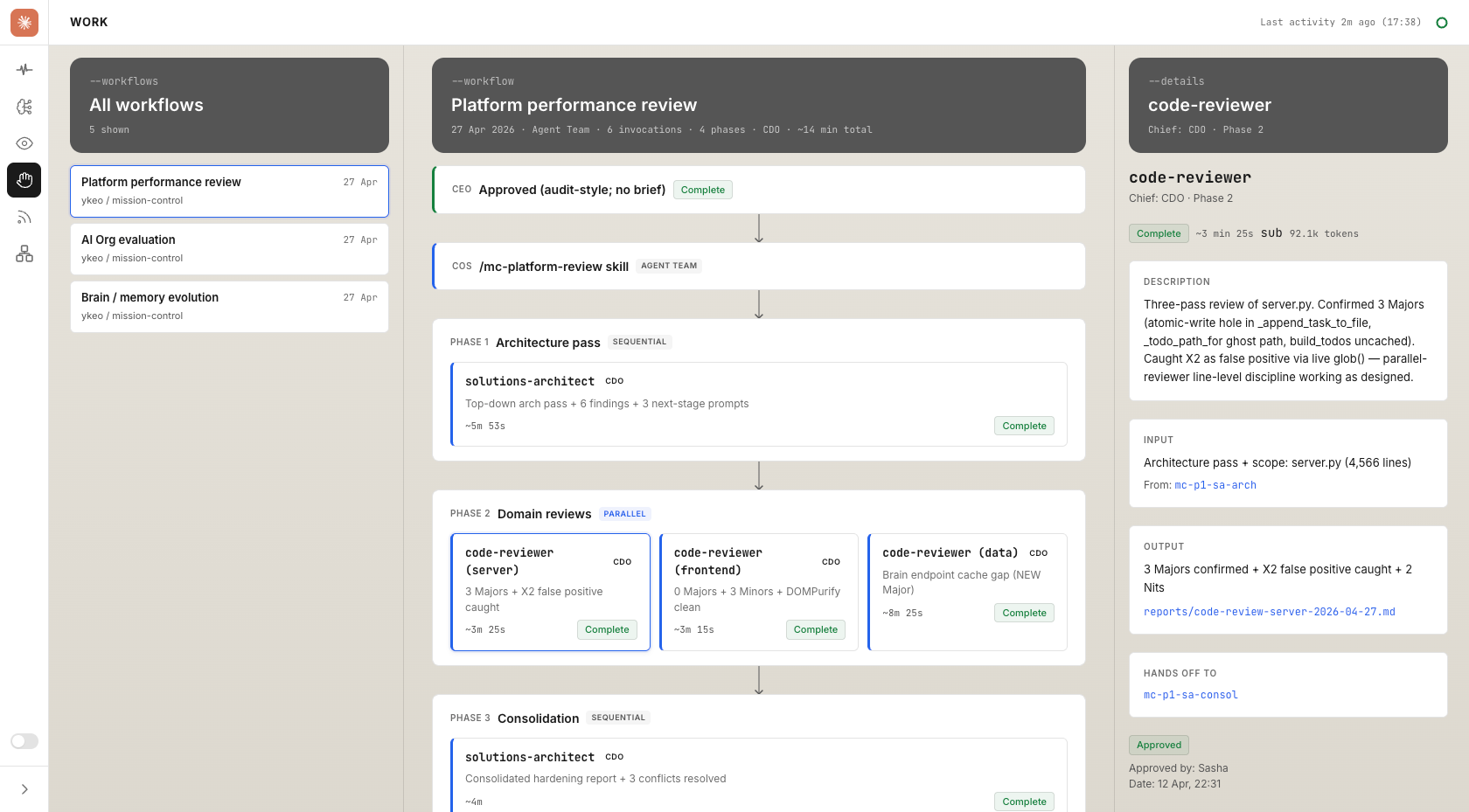
Orchestration workflow. An agent dynamically designs each workflow, assigns the relevant agent, and renders the workflow in a human readable format. Each stage shows its owner and each verification gate shows the condition that has to be true before the work moves on. The diagram is what the human sees when reviewing and verifying, and what a new agent inherits when it joins.
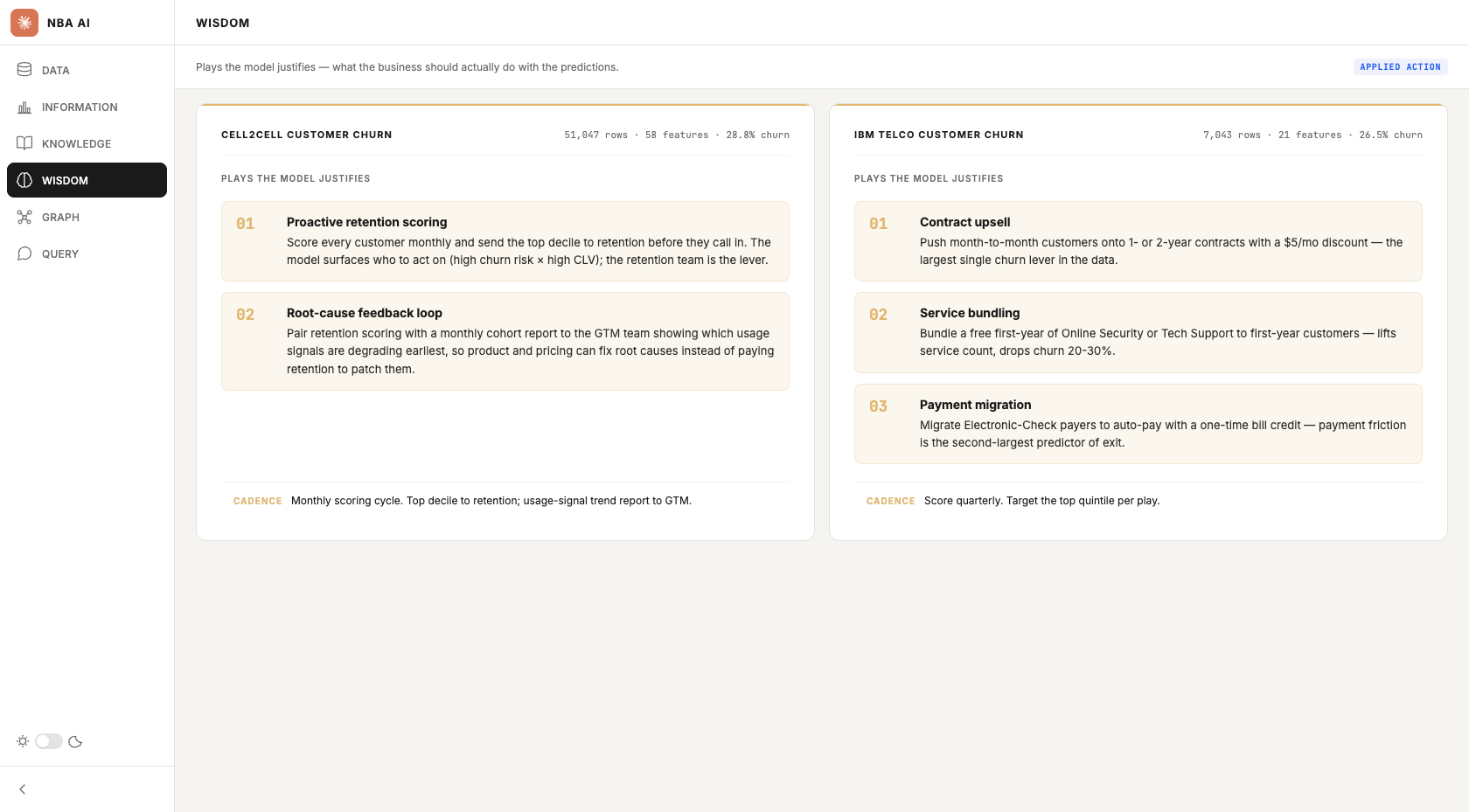
Next best action modeller. A customer-base dashboard organised around the DIKW pyramid: data, information, knowledge, wisdom, with cross-cutting graph and query layers. One scaffold carries churn propensity, retention scoring, incentive targeting and next-best-offer. Non-analysts can ask the dataset in natural language and get back tangible AI powered insights to execute.
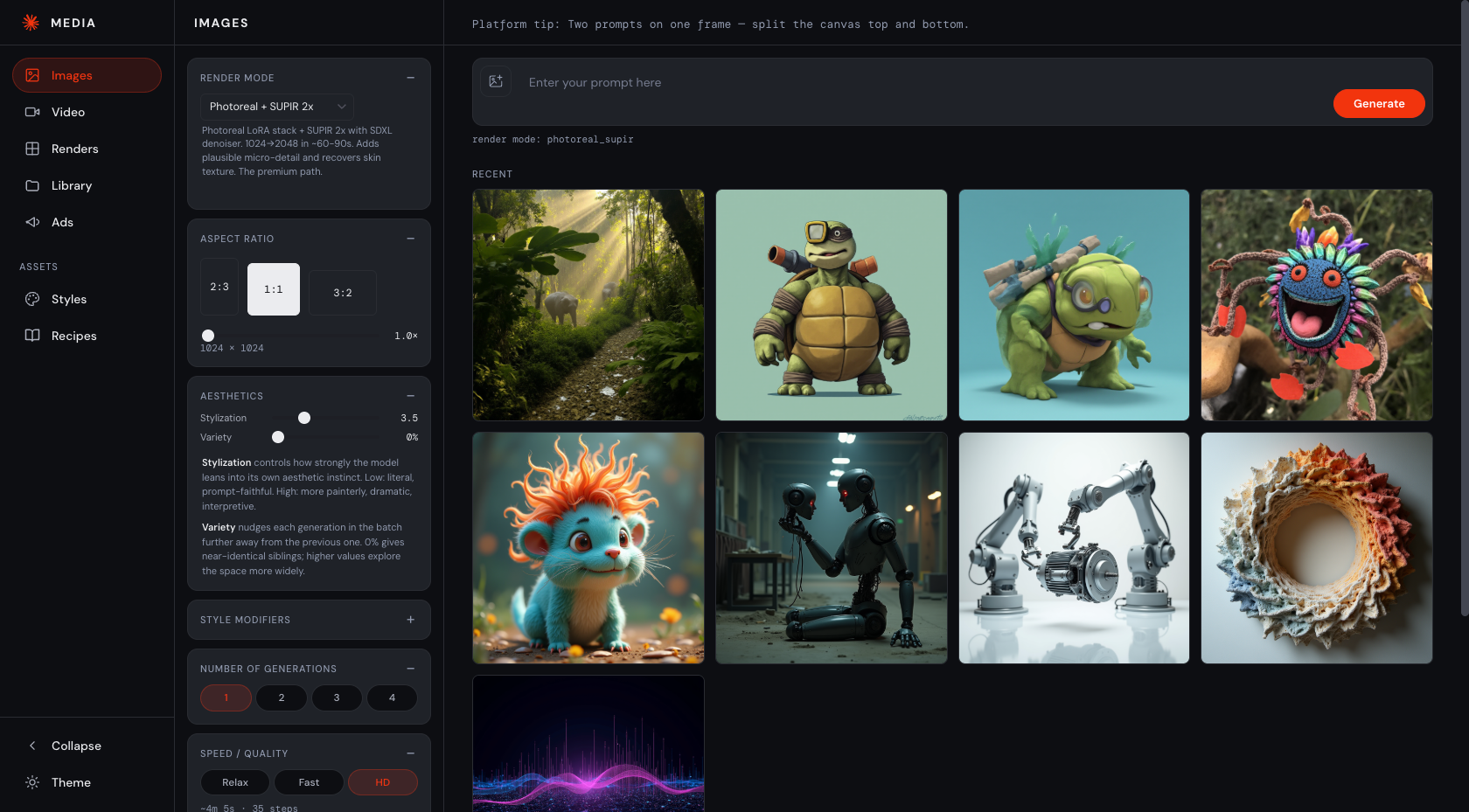
Local media creation tool. A custom media platform for image and video generation, built on top of a local ComfyUI stack running open source models such as Flux. The interface lets you pick a render mode, set aspect ratio and stylization, and generate against a styles + recipes library, all running offline on my MacBook. Additional capability includes style creation, asset management and ad format generation.
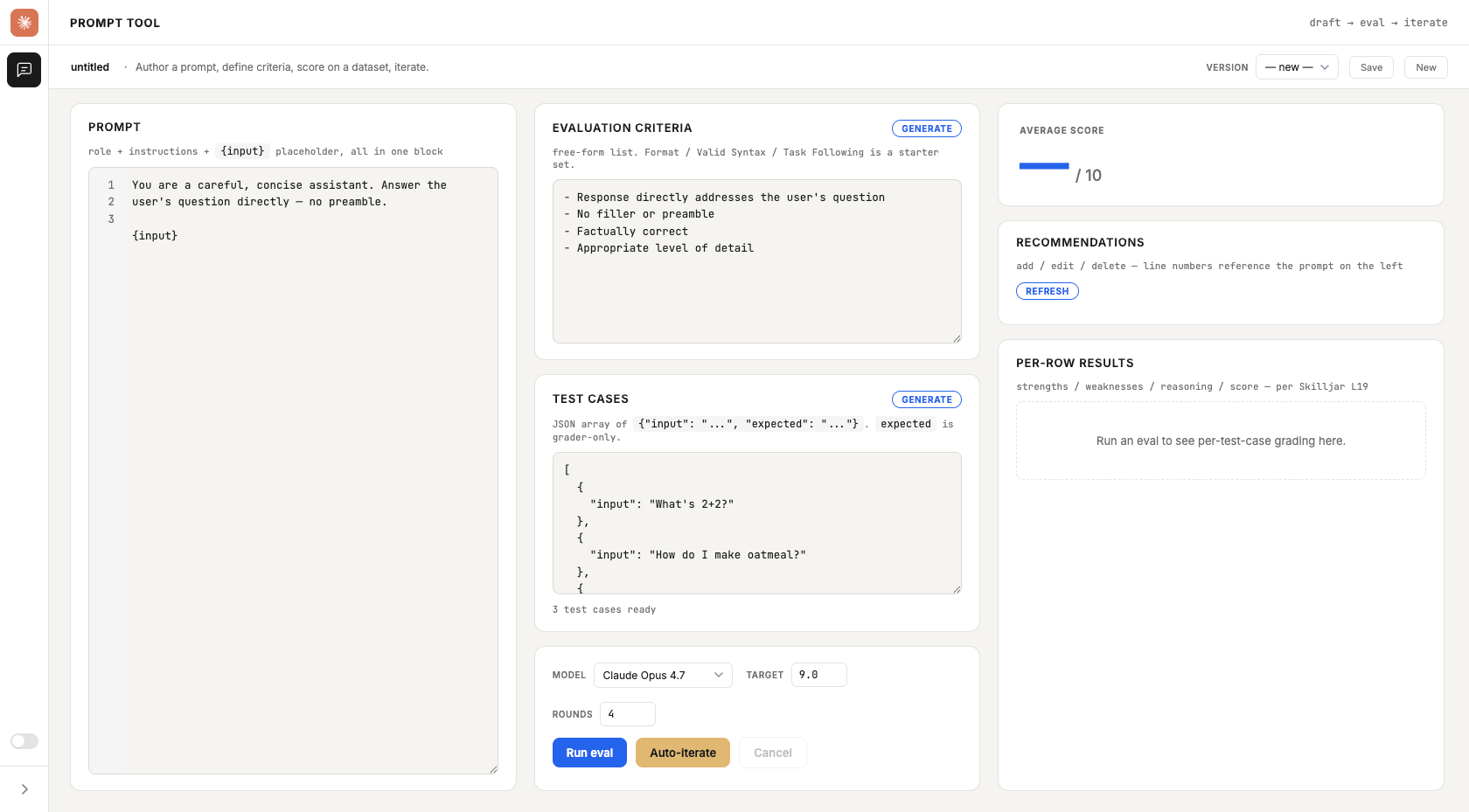
Prompt tool. A multi-vendor evaluation workbench for authoring a prompt, defining criteria and test cases, then running it across Anthropic, Google and OpenAI models. Per-row scores surface strengths, weaknesses and reasoning, and an auto-iterate loop hands the lowest-scoring rows to a "prompt doctor" that proposes a revised prompt and re-evaluates.
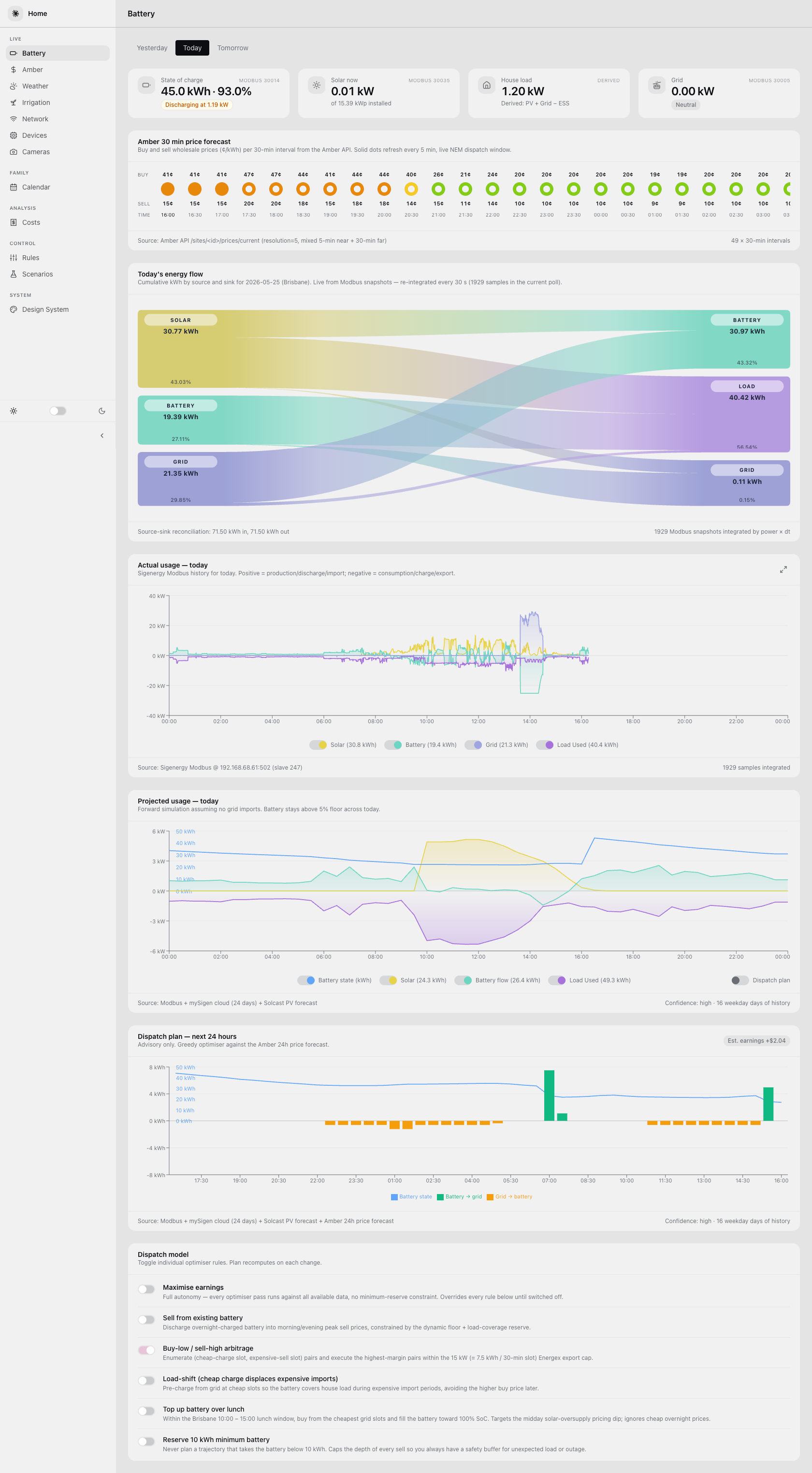
Home automation. The Home dashboard replaces a decommissioned Home Assistant VM with a Vite + TypeScript + SQLite stack purpose-built around the actual telemetry I care about. Battery state, solar generation, weather and switched plugs feed into one view. Claude Code powers wholesale energy buying and selling decisions through Amber.
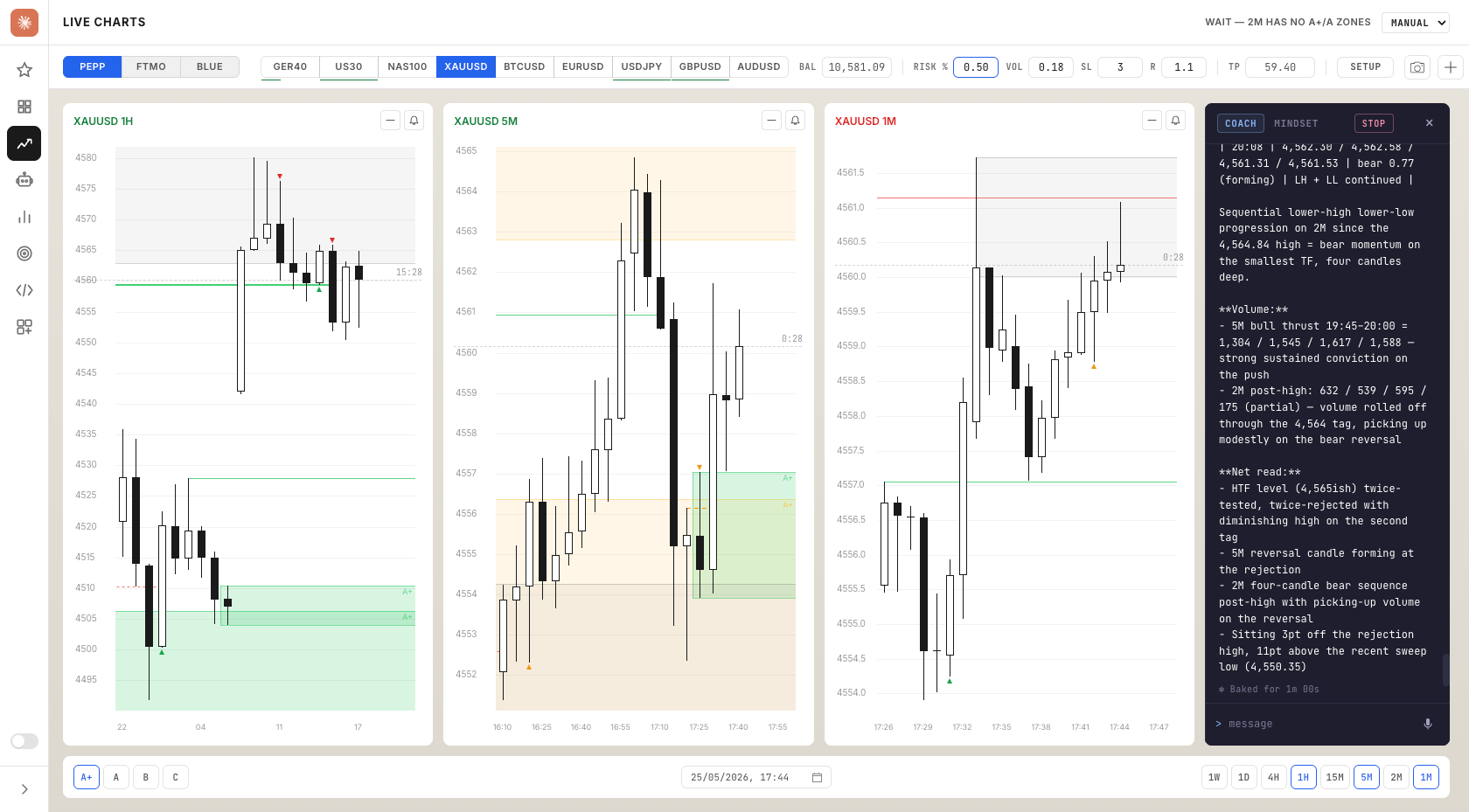
Trading agents. Autonomous agents execute a strategy on paper accounts, with the Trade Journal dashboard rendering setups, executions and outcomes against the rules they were given. Real-world autonomous execution in a domain where being wrong has a price. The journal is where verification happens after the fact.
Key learnings
The build itself has been the education. Five things stand out as the lessons I would carry forward.
Starting with one agent. The temptation when you see what a platform like this can hold is to design the full org chart upfront and then populate it, or download a bundle from GitHub. I went the other way. The first agent that handled one workstream end-to-end taught me more than ten scaffolded definitions would have. Every working agent since has shaped the org chart more truthfully than any pre-packaged bundle could.
The org chart can run ahead of the work. Most agents were scaffolded but unrouted, meaning they existed as definitions but had not been wired into any workflow. I built faster than I integrated, unwired agents are still valuable, they could just be even more valuable. The fix is unglamorous, wire every new AI agent into a workflow before scaffolding the next one. Workflows also help in delivering more consistent outputs.
The bottleneck flips from generation to verification. AI generates faster than any human can check. Once that happens, the rate-limiter on the platform is no longer "can the AI write this?" but "can I trust what it wrote?". Aside from human review, agent peer-review, lint, deploy preflights and the verification pass are not optional polish. They are the architecture that keeps quality alive at the speed of generation. Skip them and the output becomes a quality crisis.
Memory value only compounds if you build it deliberately. The AI org learns not because it's saving conversations or creating handoff files, but through human-like memory consolidation. The session-capture hook, the consolidation pipeline, the engram index, the per-agent memory files, none of these are defaults. Memory systems are gaining increasing attention. The real question however is whether the system is learning or just recalling.
Workflows provide a safeguard. A deploy curl-check used source filenames instead of frontmatter permalinks, and a dry-run rsync flagged three live articles for deletion before the mismatch was spotted. A LinkedIn scraping job triggered an overnight account restriction and was retired the same day. Neither was an AI failure. Both were workflow gaps. Wire the rules in before you scale the volume.
The next 90 days
Looking back I could never have imagined where I would've ended up and I feel that's going to be the case for the next 90 days too!
I'd like to think this was a discovery phase and next starting to define and develop a direction to take, but with the constant advance of AI it's clear there will always be the need for exploration and discovery.
This is where I feel my attention will be:
Self-evolving agents. Each agent to this point has been carefully crafted. The next step is to extend the capability of my Chief of Staff and their team to not only monitor agent performance, but proactively and automatically evaluate, model and modify agents.
Agent team performance. Current work orchestration includes a human verification component. The next step is to explore increasing autonomy within the team, agents taking on increasing responsibility for other agents, and ways of working and team topologies to optimise performance.
Autonomous learning. Building on the AI org's memory system, and more than a scheduled heartbeat, what does always-on autonomous learning look like, what rate of compounding can be achieved, and what value can be derived and measured from the process.
The exponential. Using AI we often default to how this can help with our existing workflow or process. Agent teams can plan and execute their own workflow, which is a significant paradigm shift. I'm keen to explore what that next paradigm beyond this is.
Frequently Asked Questions
What is a one-person AI org?
A one-person AI org is a structured team of AI agents, skills, workflows, hooks and memory that a single person can operate. The tools answer prompts. The org accumulates judgement, routes work between specialists, captures what each session taught it, and surfaces only the decisions that need a human. One operator sits at the top of it instead of a head count.
Do I need to know how to code to build one?
Not in the way you might think. The platform described here contains roughly 490,000 lines of code, but most of it was generated by agents against briefs, not typed by hand. What you need is the ability to write a clear brief, read outputs critically, and iterate when an agent drifts from intent. The bottleneck is knowing what you want your agents to do.
What does it cost to run?
Low single-digit dollars per month for the scheduled reporting stack that pulls analytics, search data, and AEO probes on cron. On top of that sits Claude Code Max (AUD 340/mth), plus usage-based calls to Anthropic, Google, OpenAI and Perplexity APIs. The 25 local Ollama models are free once you own the hardware. Cost scales with scope, not with the number of agents.
How long did it actually take?
All of the work happened after hours, typically 4-5 hours of most evenings over 90 days, roughly the equivalent of 3 working days per week. The platform however did not start from zero. The Claude Code subscription, the Anthropic and Google API access, the Siteground hosting, the Ollama setup, the domain portfolio, all of that pre-existed the window.
What would you do differently?
Wired in workflows earlier. Two things broke that were both workflow gaps, not AI failures. A deploy curl-check used filenames instead of frontmatter permalinks, and a dry-run rsync flagged three live articles for deletion before the mismatch was spotted. The deeper shape was that agents got scaffolded faster than their workflows did, so the org chart ran ahead of the work. Workflows are the safeguard, wire them in before you scale the volume.