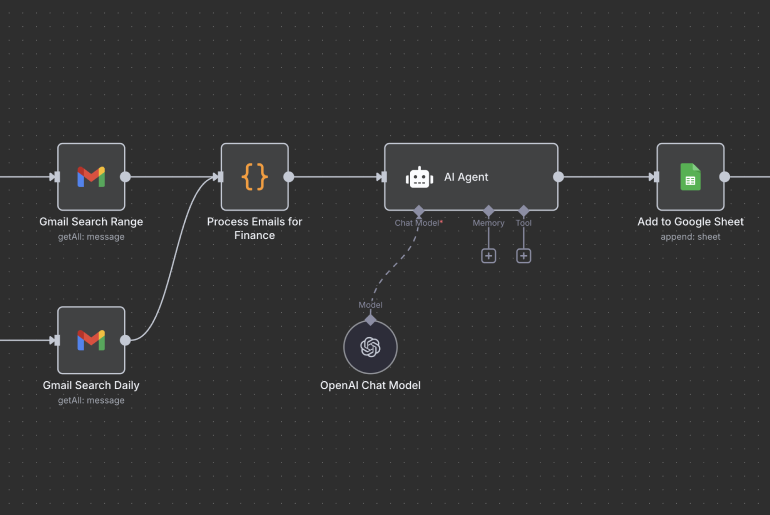
Free Receipt Extractor AI workflow
I built an AI workflow, it solves a 'real problem' and it’s free to download. You don’t even have to like, comment and repost this to get the download link either, though this wouldn’t be unappreciated.
Maybe it’s just my echo chamber but there have been a lot of AI workflows being posted lately and I’ve been keen to share what I’ve been up to too. My very first creation was back in January 2024 using MindStudio to build QuickMeals, but over the last 3 months I’ve fallen in love with n8n and have been aiming to build one AI workflow each week as a bit of a learning challenge.
The challenge I’ve seen with many workflows that have been posted is that they don't solve a problem for most—whilst I’d love to have an automated TikTok account being fed Google Veo 3 generated videos, the reality is I’m unlikely to do so, nonetheless those workflows (and subscriber results) are amazing.
So here’s my ‘super boring’ n8n AI workflow you can download and use, and if you’re just starting out, a fairly simple one to play with. If you’re new to n8n, check out the n8n AI workflow hack for a quick way to get started.
The problem
I sign up for and experiment with many online subscription services, see Stop paying for AI subscriptions. Most I just trial before the paid subscription kicks in, others I keep, and many more I forget about and get billed. Over time these add up and I just don’t spend enough time sifting through emails and bank statements until its too late!
The solution
An AI workflow which automatically identifies and collates receipts, and notifies me when a payment has been made.
The process
- Each day my n8n AI workflow checks my GMAIL for receipts
- It extracts key information from the email, e.g., date received, sender
- Then uses AI to get other information, e.g., summary, total amount paid
- It then writes this to a Google Sheet, and lastly
- Sends me a Telegram notification
Instructions
- Download my Receipt-extractor AI workflow and UNZIP the JSON file.
- The n8n workflow requires an n8n account—the quickest way to start is to sign up for the free 14 day trial here: https://n8n.io/pricing/
This is not an affiliate link but if you find this article of value I'd appreciate you sharing it.
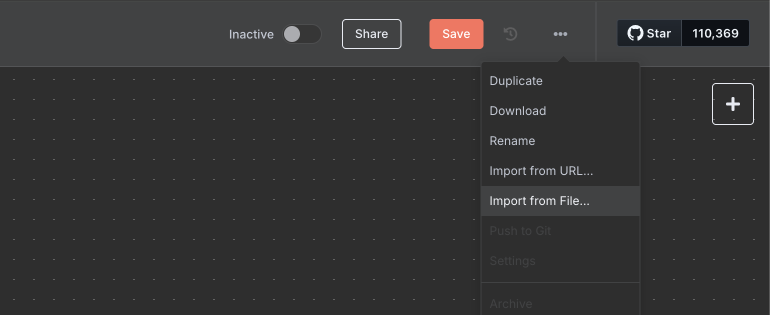
Pricing works out to be approximately AUD 35 /month but once you get going I would recommend getting set up with the n8n Community Edition for free on your own hosting as I’ve done. - Once logged in create a new workflow and select "Import from file" as in the screenshot below:
- Once this file has been imported you’ll have the workflow in your account looking something like this:
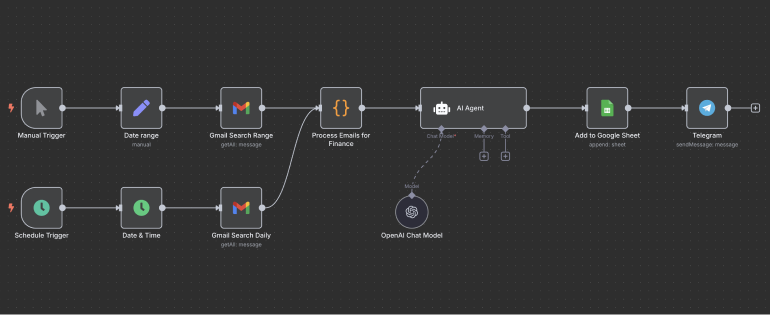
- To get this working you now need to click into each of the nodes and connect your accounts: OpenAI, Gmail, Google Sheets, & Telegram.
You can find instructions on how to do this here:
OpenAI Credentials:
https://docs.n8n.io/integrations/builtin/credentials/openai/
Google Credentials:
https://docs.n8n.io/integrations/builtin/credentials/google/
Telegram Credentials:
https://docs.n8n.io/integrations/builtin/credentials/telegram/